Gateway Templates are used to control the processing of the Gateway transactions and to validate users. Each template file has the e-mail name of a sender or recipient with extension .FST, and is kept in a folder named with the name of the applicable domain:
The sub-folders for Sender Templates and Recipient Templates are (from CopiaFacts 8.3.0.195) kept in separate folders. In earlier releases, all template folders were in a single folder.
 | To receive e-mail in the Gateway, a folder named for the domain is required in the GwRecipientDomains folder. Template files in this folder may not be required if the system is processing only basic e-mail to fax. |
The normal folder structure is as follows:
|faxfacts
|
|––gwtemplates
|
| |--copia.com (authorized sender domain)
| |
| | |--amy.fst (sender mailbox)
| | |--steve.fst (sender mailbox)
| |
| |--another.com (authorized sender domain)
| |
| | |--default.fst (all senders authorized)
|
|--gwrecipientdomains
|
| |--fax.company.com (incoming gateway domain)
| |
| | |--remove.fst (action mailbox)
| | |--secure.fst (special mailbox)
The GWTEMPLATES and GWRecipientDomains folders can optionally be moved (see below) to a local folder instead of their default location in the FAXFACTS folder. This allows incoming e-mails to continue to be validated and received even if there is a network outage and the CFGATEWAY service switches to maintenance mode.
The mailbox name above is the filename part of the FST file, for example STEVE.FST. Template commands are copied to the FS file generated as a result of the incoming e-mail.
The two types of template, sender templates and recipient templates, are used as follows:
•A template is a sender template if its domain (the name of its parent folder), is different from the destination domain of the incoming e-mail. Such templates are normally used to validate the sender of the e-mail and specify their processing options in an email-to-fax environment. A default.fst template if present, validates all incoming sender mailbox names from the domain which do not match a named template.
•A template is a recipient template if its domain (the name of its parent folder), is the domain which is the destination domain of the incoming e-mail. Such templates would normally contain a $worker_box command to perform some action on receipt of the e-mail for the specified mailbox at the domain, for example removing a destination from a broadcast list or saving a public key from a signed message.
See the Recipient Templates and Sender Templates topic for more information about each template type, and the Working with Templates topic for examples.
To move the folders GWTEMPLATES (sender templates) and GWRecipientDomains (recipient domains/templates) to a local folder, it is essential to use the Move Folders button on the Validation tab in GWMANAGER. We recommend that you make a backup of these two folders before starting.
Do not attempt to move the folders manually: the Gateway manager and the Gateway service will fail to locate them.
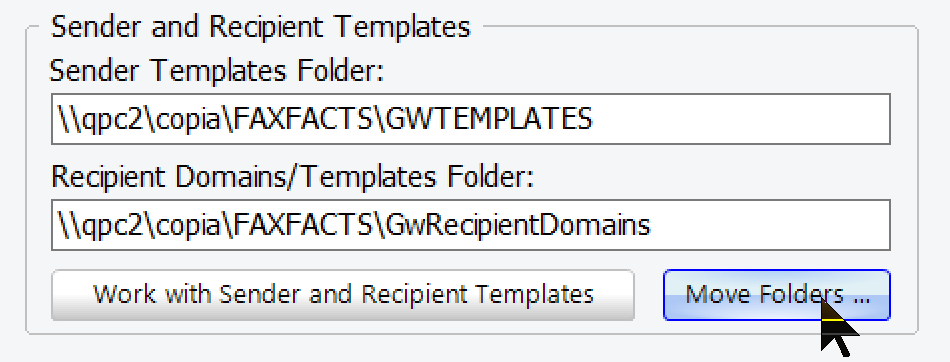
This operation must be performed with the CFGATEWAY service stopped, and with no other unsaved changes pending in GWMANAGER. If not, the dialog OK button will be disabled. Check that all the steps specified in the dialog shown below have been actioned before you initiate the move:
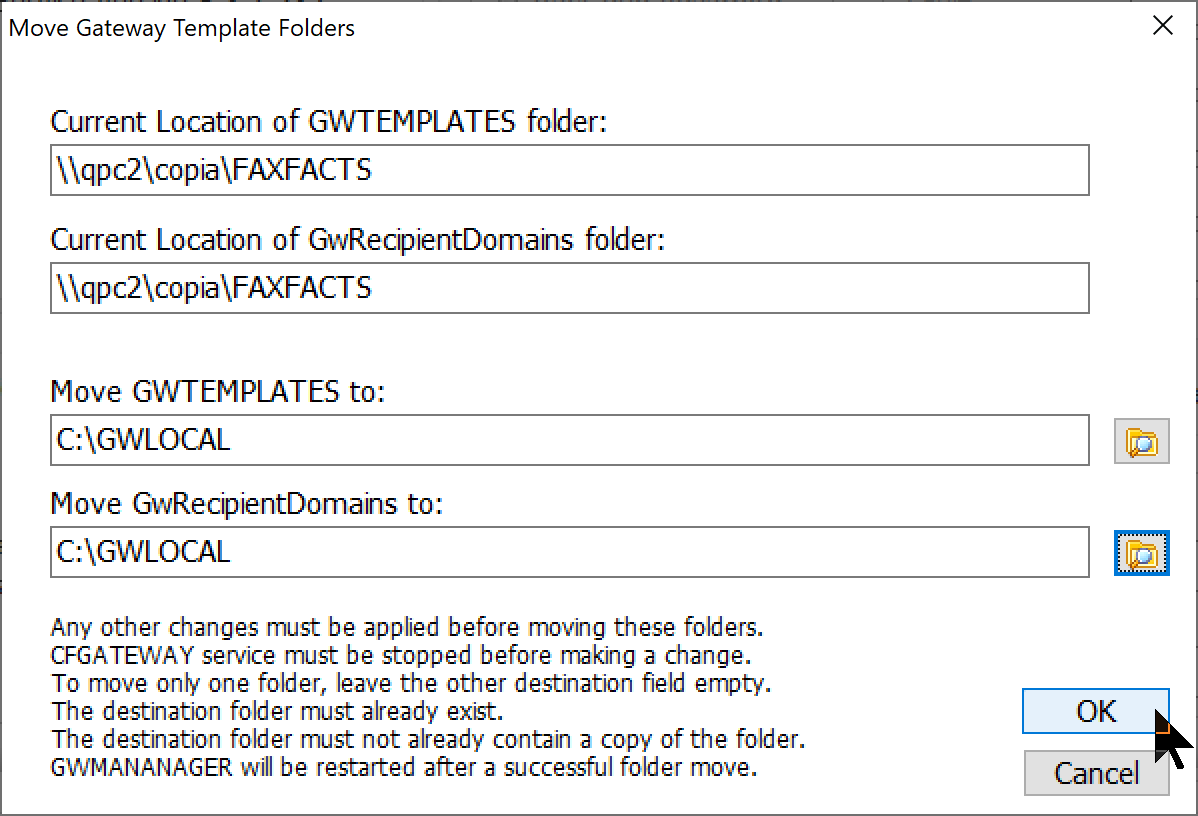
The dialog can of course also be used to move the folders back to the FAXFACTS folder in the COPIA share.
If you run multiple Gateway nodes and need to have the two template folders in a local folder on each machine, you can control-click the 'Move Folders' button to copy the folder(s) instead of moving them. Use this option with care, and note that:
•the copy operation will update the registry settings to use the new location, not the old one.
•the copy operation still requires the folder not to be present at the destination
•you will need to make your own arrangements to keep the copies synchronized
