Recipient templates provide a way to process email messages sent to a specific mailbox instead of to a fax number such as faxnumber@fax.company.com. Examples include:
•automatically processing email list removal requests for example by e-mail sent to remove@fax.company.com.
•processing incoming requests for product literature via email, order processing, setting up your own SMS gateway, setting up a custom filter for your own email, or just about any process you can think of. Each one would need an address of the form action@fax.company.com
•Receiving encrypted e-mails, which are encrypted with the Gateway's public key. In this case a specific mailbox name is required, for example secure@fax.company.com, and you will decrypt the e-mail to this address with its private decryption key. When secure e-mail is used for email-to-fax operations, the fax number must be placed in the e-mail Subject: header. See Signed and Encrypted Incoming E-Mail for details.
•with the special command $worker_box Fax#InSubject as the first or only template command; to allow non-encrypted e-mail sent to the mailbox named in the template to initiate a fax to the number specified in the Subject: header. This action is automatically implied by the presence of the decryption certificate specification for secure e-mail, which therefore does not require this keyword. No other commands in this template are normally needed in this recipient template. This recipient temp;late is normally used when your corporate mail sever is configured to forward email to the gateway from a local mailbox used for email-to-fax.
Recipient templates must always contain a $worker_box command to implement the action. In the case of secure email-to-fax operations, the command will be replaced in the generated FS file by a $fax_phone command.
Recipient Template Location
Recipient templates .FST files are saved in a folder named for the domain (e.g. in folder fax.company.com). The recipient domain folders(s) are now all in a folder FAXFACTS\GwRecipientDomains; it is also possible to move this to a local folder if required. The rules for recipient domains are:
•The domain must be named in the list on the Service tab in GWMANAGER.
•A folder for the domain must be present in the GwRecipientDomains folder, even if there are no named mailbox actions for this recipient domain. This is the case for simple email-to-fax operations with no special actions.
•A folder for the same domain must not be present in the defined Sender Templates folder (default FAXFACTS\GWTEMPLATES), unless you have enabled the use of the corporate email domain in the Gateway.
•A template named for the recipient action (e.g SECURE.FST, REMOVE.FST) must be present in the corresponding domain folder for each action you wish to implement.
Recipient Template Maintenance
Recipient templates should normally be maintained within GWMANAGER (see Working with Templates) but can also be edited separately using COPIAEDIT. Both these editors offer syntax highlighting and integrated command help. Avoid Windows utilities such as Notepad or Wordpad, especially if you have set Unicode or UTF8 encoding for FS and FST files. The templates are plain text files containing valid FS file commands.
There is only one SMTP_OPTIONS keyword for a recipient template. The keyword ValidSender specifies that the recipient requires a valid sender template to accept an incoming e-mail. This value may also be specified as 00001 using the legacy options format.
Recipient Templates for 'fax number' Mailboxes
For special handling of certain fax numbers you can create a template for a fax number mailbox, for example 641741600.FST for e-mail sent to 6417416000@fax.company.com. Normal punctuation is removed before looking for this type of template. Since the gateway looks for recipient templates before attempting to use the mailbox name as a fax number, you may have special recipient fax numbers for custom processing. You may also specify an option in the recipient template to require that the sender be validated in order to send to the special recipient. This offers you another level of security in processing the email messages.
Template Precedence
Recipient templates normally take precedence over sender templates. That means that if a recipient template exists for a recipient then that template will control the initial processing of the message for that recipient.
Sender templates may be used to perform sender validation and to provide some customization when email is sent to a mailbox identified by a special recipient. Secure faxing is special case of his type: the recipient template commands are used to decode and/or verify the incoming message, but then the presence of a fax number in the message subject would cause the recipient to be a fax recipient instead of a special recipient.
The gateway examines each incoming email message recipient to determine if the recipient has a corresponding recipient template.
Wild-card Recipient Templates
For some applications it may be useful to have special recipient templates that handle email for multiple recipients. You do this by providing a list of wildcard mailbox names and the name(s) of the recipient template(s) that will handle mail sent to mailboxes matching the wildcard specification(s).
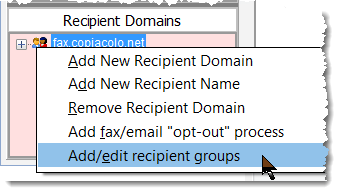
To access this feature, right-click a recipient domain name in the list of recipients and select Recipient Groups to bring up a dialog allowing you to specify wildcards names and target template files.
You could use this feature to handle responses to and/or bouncebacks from email marketing campaigns by specifying unique reply-to addresses for each recipient in the campaign broadcast. The bouncebacks and replies from the email broadcast would be sent back to the unique reply-to address, but would be processed by the single script associated with the special recipient template that handles your email campaign responses. You would be able to associate the response with the original email using the unique reply-to address. You can also use this feature to place unique email contact addresses in various web marketing pieces to track web campaigns and to provide automated follow-up with your customers.
