The COPIAFACTS Server Engine program has a number of run-time options which were formerly specified as command-line parameters. To set these run-time options and parameters, use the Options page in COPIAFACTS.EXE.
 | Some items remain in the window (marked with an asterisk) and may not be documented below if they are no longer used. |
Although these options can be changed without restarting COPIAFACTS, in several cases it may not be prudent to do so.
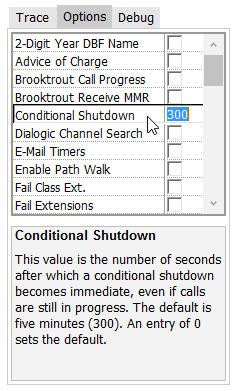
The available supported options are as follows:
| 2-Digit Year DBF Name | This flag may be set for compatibility with earlier releases which used only two digits of year for the name of the DBF log file created each day. |
| Active Count All Channels | This option may be set to show all channels in the analysis of active channels displayed in the trace file at the end of each session or day. When not set, only channels with inbound voice or fax capability are analyzed. |
| Brooktrout Call Progress | This option causes raw call progress values to be displayed in the trace file, to assist in configuration of the parameters in BTCALL.CFG and in debugging call progress problems. |
| Brooktrout Receive MMR | This option causes received fax files on Brooktrout boards/ports to be saved in MMR format (higher compression). |
| Conditional Shutdown | The value of this option is the number of seconds after which a conditional shutdown becomes immediate, even if calls are still in progress. The default is five minutes (300). |
| E-Mail Timers | If enabled, records details of each step of an e-mail transmission in EMTIMERxx variables. For details, see Appendix L. |
| End Session Immediate | If enabled, causes COPIAFACTS to shut down immediately on Windows end session (log out or shut down), with potential loss of incoming or outgoing transactions. The default is to initiate a controlled shutdown. Note that the selected action may be taken even if some other running application blocks Windows shutdown. |
| FAIL Class Extensions | This option causes FAIL directory FS file extensions to be replaced with the retry class letter derived from the final status2 value. This change makes it easier to write a "watchdog" monitoring program for specific error types, avoiding the need to open and read each file to determine the reason for failure. The 'fail extensions' option overrides this one. |
| FAIL Extensions | This option causes FAIL directory FS file extensions to be replaced with a number formed from the last three digits of the final status2 value. This change makes it easier to write a "watchdog" monitoring program for specific error types, avoiding the need to open and read each file to determine the reason for failure. |
| Fax Local Copy | This option causes temporary local copies of fax files to be deleted at the end of each outbound call. The default is to simply re-use the same file names for later calls on the same channel. |
| Flush Trace Buffer | This option causes the trace files (*.TR*) to be committed to disk more frequently. Copia support staff may request that you set this flag to ensure that the trace files contain data generated immediately before an abnormal termination. This switch should not be used in normal operation as it somewhat impacts performance. This option does not affect operation in service mode. |
| Flush Trace Buffer (service mode) | This option operates as Flush Trace Buffer but affects operation in service mode only. It defaults to enabled, but can be disabled in production when service mode operation has been fully validated. |
| Full Page Fax | Forces fax pages to a length of 11 inches or A4. Use this flag to eliminate short pages. It affects only ASCII files transmitted from Brooktrout fax. |
| Ignore Loop Current Off | Required for certain HDID environments, the value of this option (in seconds), ignores spurious loop-current drop events which the hardware may generate at the start of the call, if they arrive within a number of seconds less than that specified, after the start of the call. For example a value of 3 ignores such events in the first two seconds of the call. Implemented for Dialogic only. |
| Ignore Missing Files | This option ignores missing files named on a $fax_filename command. Otherwise the FS file is rejected if specified files are missing. |
| Keep Graphical Cover | Uses a different temporary filename for each file created by CF9IMAGE.DLL, instead of a filename based on the channel number which is continually re-used. The filename is formed from the FS file basename, with '_F00' added for a cover sheet, and '_F01' and upwards for any GCT or GTT files named on $fax_filename commands. The CALLBACK\TEMP folder is the default folder for these files, but the owner\TEMP folder is used for Job Admin items. The KEEP_GCV variable has the same effect for an individual FS file. The file is instead left in the folder defined as $local_temp if the normal destination folder is local. |
| Kill Failed Fax Channel | On Dialogic Diva boards, causes the channel to be taken out of service under certain failure conditions. |
| Maximum Variable Space | No longer used - the space for variables is limited only by available heap memory, bur see also Environment Variable MAX_VAR_SPACE |
| Multi-page TIFF Receive | This option has been disabled and always defaults to checked. You can override this option for individual fax mail boxes with the $media_type command. |
| No Call Progress | This option disables all call progress and global tone detection actions. It is provided principally for use when CopiaFacts is used with older versions of voice board drivers. Previously this function was specified by the NOCALLP environment variable. |
| No Custom Error Handler | This option disables the COPIAFACTS custom handler for program exceptions and allows the exception to be handled by the default handler (normally DRWTSN32). This option may be recommended by Copia support staff when an exception external to CopiaFacts causes COPIAFACTS to crash. |
| No File Type Check Flag | If queues and fax send channels have been configured to ensure that fax-on-demand callback requests can be handled on the correct machine, you can use this option to disable the normal check which ensures that the file type can be handled on all machines which can possibly see the callback request. |
| No Loop Current Check | This option causes loop current detection to be disabled. With some Brooktrout hardware combinations this switch is required to avoid call placement outcome 259. |
| No Self-Busy Check | This option controls the use of lock files in the ACTIVE directory to prevent two CopiaFacts outbound phone lines or ports from dialing the same phone number. The normal operation of CopiaFacts will not allow more than one channel to call the same phone number. This option removes that test and can be used if you know that most of the numbers which you are faxing have more than one inbound fax machine. Do not change this option while COPIAFACTS is actively processing outbound items on any node. |
| No Voice Message Check | This option suppresses the checking for the existence of voice message files every time a user profile is loaded. Normally COPIAFACTS analyzes the user profile and for example if $update_image has been used checks that all the standard voice prompts are available to handle remote image updates. With this option, these checks are omitted after the configuration file and default user profile have been validated at program startup. The option also suppresses all checking of directory names. |
| Operations Monitor Alert | This option causes COPIAFACTS to write a file every fifteen seconds which can be used to verify from another network machine that the COPIAFACTS program and the machine on which it runs are still operational. The filename nodename.OMA is used (for example, M1.OMA). The file also contains status information about each channel and call total summaries. This file is used by OMACHECK. This setting is enabled by default. |
| Quit Conditional / Immediate | In the design of your system you may wish to have the COPIAFACTS program exit in order to do other processing. CopiaFacts provides an option to specify what time you wish the program to terminate. The exit can be immediate and unconditional, terminating any in-process calls, or it can be orderly, completing any current calls but not starting any new calls. Upon completion of the current call the program then exits. The option value is a time of day in the format hh:mm:ss (seconds are optional). You can also prefix the value with a + to indicate a time interval from the startup time. |
| Quit on Logging Error | This option causes COPIAFACTS to shut down on any logging error. |
| Search Interval Max | When the COPIAFACTS program is idle, it searches the TOSEND subdirectories for outbound and callback requests to be sent. If the search was done continuously, the network performance might be affected. There is therefore a default delay of 20 seconds before starting a search when the previous search has yielded no files to send. You can specify a different delay time in seconds for the search as the value of this option. For example a value of 180 would search only every three minutes. As soon as a request is processed, the search is restarted, even if the timeout period has not expired: but see also the Search Interval Min option below. |
| Search Interval Min | This option modifies the operation of the Search Interval Max value described above. In this case the search is not restarted as soon as a request is processed, and the specified timeout is reset, even if it has partially expired. For example an value of 120 for this option guarantees that the outbound queue will not be searched for two minutes after a request has been processed (unless an earlier outbound operation has managed to get scheduled, and then terminates). Intended for multiple-node applications, this option effectively makes the current node significantly less likely to be used for outbound operations and allows it to concentrate on requests. The current node will, however, automatically pick up outbound operations after the specified delay if the other nodes are either busy or not operating. If you use this option, you should make sure that another node on your network is normally configured for outbound. |
| Search Interval TOSEND | The value of this option is a number of seconds. It is used to control the intervals at which COPIAFACTS checks the main TOSEND directory for outbound fax-on-demand files when the numbered TOSENDx directories are in use for broadcasts. The default is 20, which means that every 20 seconds COPIAFACTS will look for FS files in the main TOSEND directory. If no available files are found there, the search works back up through the TOSEND directories in sequence, resuming where it left off in each TOSENDx directory. This feature ensures that fax-on-demand outbound faxes, or job proofs and reports, get sent even during large broadcasts. |
| Special Debug Code | The value of this option is used to specify options which can be implemented for field test purposes. Copia Technical Support will advise on the use of this option. |
| Special Kill Code | The value of this option specifies the circumstances under which the OMA file will cease being updated. This is used to flag specific errors for systems which monitor the OMA file. Copia Technical Support will advise on the use of this option. |
| Suppress Status/Counts | Checking this option suppresses the updating of the Channel Status area and the Count area above it on the Options page. This is only done when Trace to Display is disabled. |
| Support COM in DLL | This option is provided for customers who need to access a COM object in any user-written DLL functions. It forces a call to CoInitializeEx(NULL,COINIT_MULTITHREADED) as each CopiaFacts channel processing thread is started and a corresponding CoUninitialize() call on thread termination. If this means nothing to you, you probably do not need this option. |
| Wait before Transfer | This option specifies a delay in milliseconds before connection of the originating call to an outbound call, using the SC-Bus. The delay prevents the caller from hearing the DTMF digits used to place the outbound call on an analog line. The default is 1.5 seconds, equivalent to a value of 1500. After this delay, the caller will then hear any ring or busy tone on the line before the called party answers. |
| Wait-for-Poll Delay | The value of this option specifies the number of seconds that a Dialogic board should wait to distinguish between a fax receive or fax poll tone in one-call fax-polling operations. The default is 20. |
