Windows Printer Driver for Fax
FFSAVE (cannot be run stand-alone)
CFUTIL SAVEAUTO path|CLEAR|STATUS
FFSAVE is the visible dialog of a simple 'fax save' printer driver which allows saving files in multiple-page TIFF/F format. Files may be saved in a CopiaFacts image location defined in a user profile, in the current user's TEMP directory in the USERJOBS directory tree, or as any named file.
FFSAVE is not available on all Operating System versions supported by CopiaFacts. See Printer Driver Support for a current list.
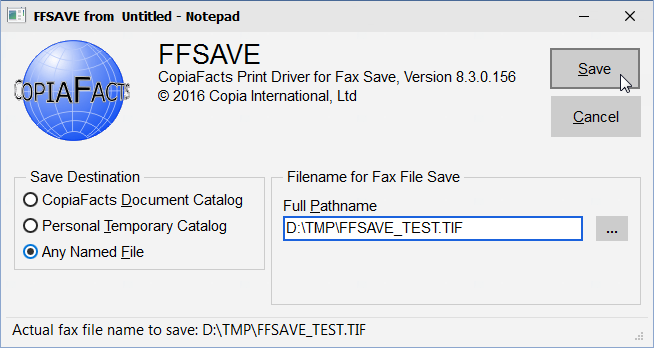
FFSAVE cannot be run from the command line, and writes no FS files. FFSAVE does not increment the extension of .1 files, and defaults to save with .TIF extension.
Installing FFSAVE
FFSAVE is optionally installed with the CopiaFacts Server Installer. The components installed are the Fax Save printer driver, FFSAVE.EXE, and SAVEAUTO.EXE.
FFSAVE uses FFTRACE to enable status and debugging messages. However the messages do not appear in the FFTRACE window. Instead they are written to a trace file FFSAVE.FTx in the FFMERGE common folder (if FFMERGE is installed) or in the folder specified by an FFTRC system environment variable. To view trace messages, use TRCVIEW.
Using FFSAVE
Print from your application to the FFSAVE printer. You can adjust some of the print settings from the normal Windows printer properties menu. Do not change the setting for multiple pages per file, or the TIFF/F file format. Do not change the dialog setting for FFSAVE.EXE. Some applications may require the 200 by 200 resolution setting in printer properties.
In the FFSAVE window, you can select to save to an image location (requires a user profile), or to a personal temp directory (the user temp folder is obtained from FFCLIENT if this has been run on the machine), or to any filename. The temp directory is created if it does not exist when you select this save option.
If the selected save location is a remote mapped drive or a UNC pathname, the file is first written by the print driver to a local temporary folder, then moved to the selected destination.
Saving to a specific file extension other than .TIF has no effect on the file format, which remains TIFF/F format.
FFSAVE is available for licensing to clients of fax service bureaux who use CopiaFacts software. If no other CopiaFacts software has been installed, only the "save to any file" option is enabled.
The directories and save filenames are remembered from one print operation to the next, but not the document number.
For saving to a document number, the filename is limited to 15 characters, to conform to the limit which will applies in the main COPIAFACTS program for image selection. You can save to longer file names using save to any file, but this is not recommended. Note that left-zero-expansion affects only all-numeric filenames of less than 8 digits, and only expands to make an 8 digit filename.
The first image location command with a matching range is selected to give the directory name for saving the file to an image location.
You can configure FFSAVE to save a file to a pre-determined pathname, by using the SAVEAUTO facility, for example as:
CFUTIL SAVEAUTO c:\tmp\savehere.TIF
Running SAVEAUTO from a Windows console session will cause FFSAVE not to pop up a window at print time. Instead it will write future files to the specified path. The pathname is saved in the registry and remains in effect until changed or cleared. To clear the SAVEAUTO pathname, use:
CFUTIL SAVEAUTO CLEAR
To display the current save path, use:
CFUTIL SAVEAUTO STATUS
If you are writing an application which is to create a specific fax file using FFSAVE, you should set the AutoFile value in the registry key HKCU\Software\Copia\FFSAVE to a string value of the required pathname, 'print' your document to FFSAVE, and finally delete the value. Note that this requires that FFSAVE is not being used for other printing on the same machine at the same time.
Launching a task on completion
You can manually enter an executable pathname or command-file name as string value "LaunchMe" in the registry key HKCU\Software\Copia\FFSAVE. If you use a batch file, enter the value as:
cmd /c batch.bat
Your program will then be run and passed two parameters, the number of pages written to the output file and the output filename (in quotes). You will see a negative page count if something goes wrong with the rasterization. This feature could be used to run a fax viewer on completion.
eDocPrintPro
As an alternative to FFSAVE, we have also tested, and recommend, the free PDF printer driver eDocPrintPro from XKEY GmbH. This driver can be used to print any document (other than a PDF) to PDF, with or without a pop-up dialog. The resulting file can be named on a $fax_filename command in the same way as you can name a TIF file created from FFSAVE, and will be converted using the method selected in the FFEXTERN conversion options dialog.
