Configure Windows Task Scheduler Tasks 
CFTASKS [OMA] [OMA_BW] [OMA_BT]
CopiaFacts requires three tasks to be set in Windows Task Scheduler in order to support OMACHECK and to enable it to control services without the need for Windows UAC prompts.
 | The CFTASKS program is run by CopiaFacts server installer automatically, so you should find the tasks already present in Task Scheduler after installation. |
| None of these tasks have triggers to run automatically on a schedule. They can only be run on-demand as described below. |
The program can also be used to remove or reinstall tasks in the Task Scheduler Library. The task name can be preceded by a minus sign (e.g. as -OMA_BW) to remove a task from the library. CFTASKS must be run elevated (as Administrator) to do this.
The tasks are used as follows:
| OMA | This task is used to run OMACHECK elevated when required. This would normally only be needed when the logged-in user name which is used to run CopiaFacts on the desktop does not have credentials to reboot the machine, and OMACHECK is configured to perform a reboot in some circumstances, STARTCOPIA has an option to start OMACHECK In this way using the OMA task. |
| OMA_BW | This task is used to run OTFSTART elevated from a command file initiated by OMACHECK when a reboot has not been configured. This allows OMACHECK to be run in a normal user account but still to stop and start the service processes without a UAC prompt. |
| OMA_BT | This task is used to run Brooktrout CONFIGTOOL in silent mode (with parameter /s) to start or restart the BostService service used by TR1034 or SR140. This allows OMACHECK to be run in a normal user account but still to stop and start the service processes without a UAC prompt. |
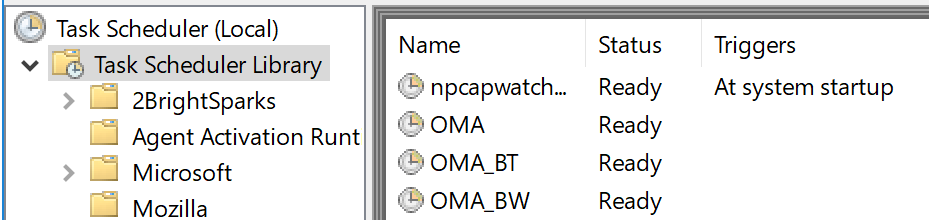
After the CopiaFacts server installer has created these tasks they will appear in the Windows Task Scheduler library, without triggers, but set to run elevated ('with highest privilege').:
Initiating the tasks in a Command file
The supplied sample files to be run by OMACHECK initiate the tasks on demand, and the same can be done in any custom batch files you construct. The syntax is as follows;
rem Restart BladeWare by running OTFSTART elevated
SCHTASKS.exe /run /TN "OMA_BW"
rem Start BostService by running CONFIGTOOL /s elevated
SCHTASKS.exe /run /TN "OMA_BT"
rem Start OMACHECK elevated
SCHTASKS.exe /run /TN "OMA"
Windows Task Scheduler will then run the tasks elevated without stopping for acceptance of the usual UAC prompt. The default setting in Task Scheduler to stop a running task after three days is disabled for the OMA task.
