Concatenate DBF Log File Data to XLSX file
CATDBFX
CATDBFX startdate [enddate] [folder=path]
This program concatenates one or more daily DBF log files into a single XLSX Excel spreadsheet. The fields are set up exactly as would result from loading the DBF into Excel, except that one additional column is added to show the descriptive text for the FAXSTAT column. For that reason you may wish to use CATDBFX in preference to loading a single file into Excel. Note that if you still use an older version of Excel with the Microsoft Office Compatibility Pack, you will be limited to 64 thousand rows in the spreadsheet.
The parameters specify a date or date range. The only permitted date formats are:
| MM/DD/YYYY | This format matches that used in all dates in CopiaFacts command files |
| YYYYMMDD | This format corresponds to the naming convention for the daily transaction log. |
| MM/YYYY | Specifies the start of a month if the first date, or the end of a month if the second date, or the whole month if the only date. |
| YYYYMM | Specifies the start of a month if the first date, or the end of a month if the second date, or the whole month if the only date. |
See the examples below.
Log files will also be opened in the date range even if you are still using the two-digit year option for log files. You should use four-digit years in the parameters.
The output file is written to the FAXFACTS\LOG folder and its filename will be generated from the date range, with day numbers if a whole month is not selected. The maximum range is one year. Dates may be specified in either order. If a date in the range has no corresponding DBF log file, it is silently ignored.
For special purposes you may also add a parameter folder=foldername at any position on the command-line to override the use of the FAXFACTS\LOG folder for both the input files and the output XLSX file. For example this allows you to analyze a group of .DBF files which you have archived to a location other than the LOG folder.
Interactive selection of DBF files
When no command-line date parameters are given, a dialog appears with calendars to allow date range selection:
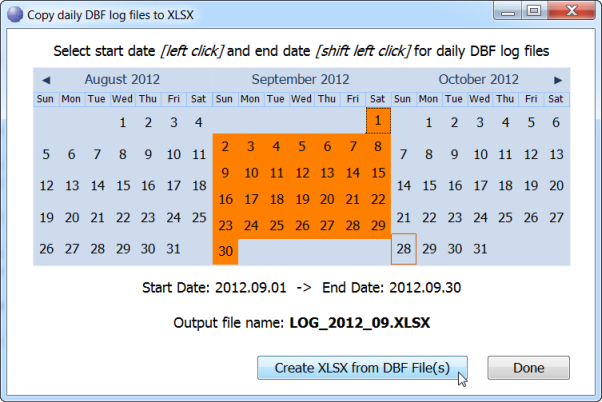
Use click and shift-click to select the date range. You can select the start or the end date first. In interactive mode, the pop-up which confirms the completed extraction allows you to open the file in Excel if you wish:

CATDBFX 20120101 ; one day
CATDBFX 20120101 20120106 ; one week
CATDBFX 02/01/2013 02/28/2013 ; all of February 2013
CATDBFX 201303 ; all of March 2013
CATDBFX 03/2013 ; all of March 2013
CATDBFX 03/2013 folder=c:\savelog ; March 2013 and folder override
CATDBFX 201301 201303 ; January to March 2013
CATDBFX 01/2013 03/2013 ; January to March 2013
CFUTIL RUNDATE -1m "CATDBFX %%Y%%m" ; all of last month (batch file syntax)
CFUTIL RUNDATE -1m "CATDBFX %Y%m" ; all of last month (command line syntax)
