XCAPI trace files (with file extension XCT) may be requested by Copia support to diagnose faxing issues. These files log all the SIP, RTP and T.38 traffic; double-clicking an XCT file will open the XCAPI trace viewer.
There is also an XCAPI SDK trace file which may sometimes be requested. This logs all API calls by COPIAFACTS to the XCAPI SDK. The pathname and logging level for this file are enabled by setting CopiaFacts environment variables or on a $environment command.
See also the XCAPI video tutorials about creating and analyzing trace files.
Configuring the XCAPI Trace file
In XCCONFIG, press F8 or click the third icon an the top to enter Expert mode, and set the location for an XCAPI trace file. It is important to limit the size of each trace file because large files can be time-consuming to open for analysis:
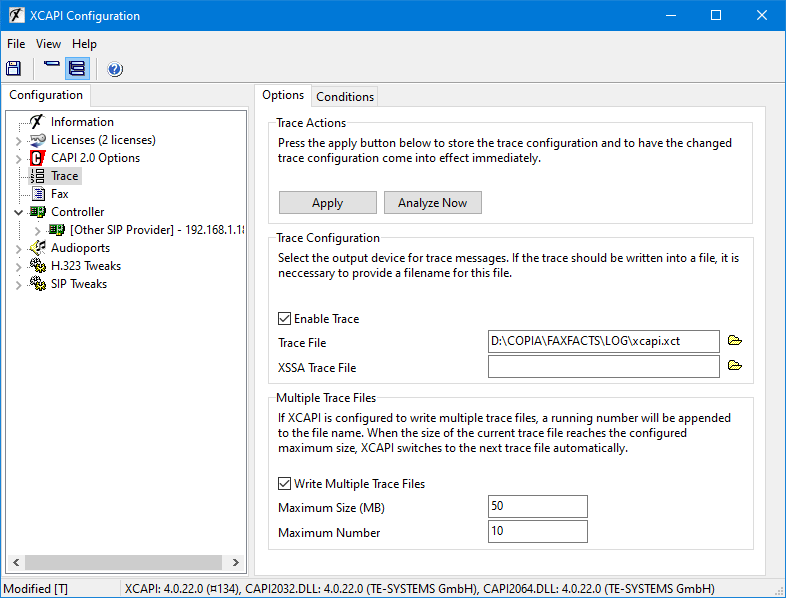
After making changes to these settings, you must click the Apply button to save them. After confguration, you can also use the non-expert mode of the XCAPI configurator to enable and disable tracing:

Creating an XCAPI Trace when requested
The XCAPI trace file does not usually need to be left running, unless awaiting the recurrence of an intermittent issue, but may be enabled only when it is possible to replicate an issue. Enable tracing when needed, and turn it off when the issue has been captured before sending the trace file to Copia support. When multiple sequentially numbered XCT files have been created, it is important to choose the correct one by means of its timestamp.
 | Always send the complete XCT file. Please do not extract single calls from the XCAPI trace viewer, because this excludes the configuration details which are included in the main trace file. |
| When sending an XCT file to Copia support, please also send the .TRx COPIAFACTS trace file for the same node. |
| Always ZIP the trace files for transmission, or use the Send To Copia right-click menu in Windows Explorer, which also ZIPs content; this substantially reduces the file size. |
Fax Document Content in XCT Trace Files
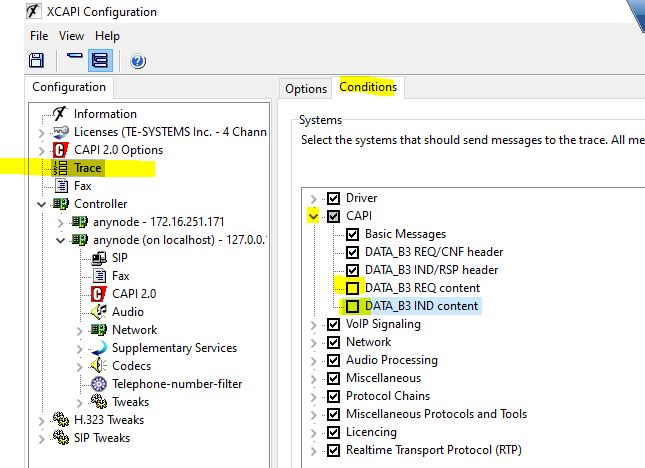
XCAPI XCT trace files by default contain the content of sent and received fax documents. For sites where personal information may be transmitted or received, or which require HIPAA compliance, you can suppress the saving of this data so that you can send the XCT file to Copia or to TE-Systems for problem diagnosis: uncheck the last two "CAPI" checkboxes shown below in the XCAPI configurator, save the settings, and restart COPIAFACTS on the node: