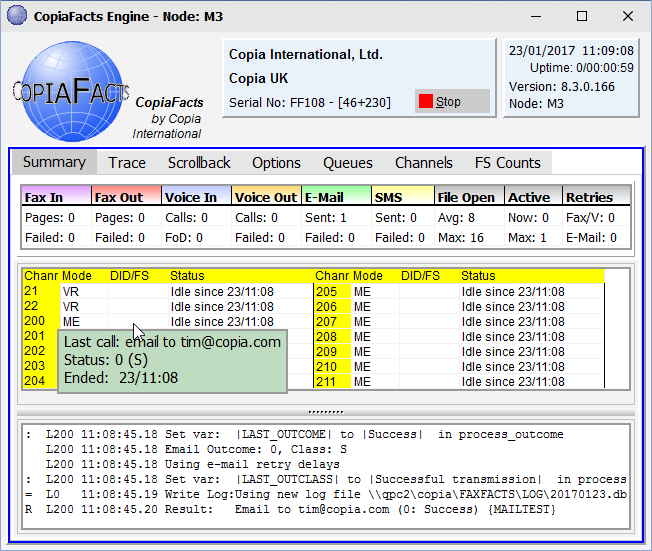
On startup of the engine, the summary status display appears. You may also view only the trace without the channel status grid (on the 'Trace' page), and there is also a facility to view trace messages which have already scrolled off the screen (the 'Scroll back' page).
The screen shot above illustrates the display of additional information: clicking a status line on this display shows additional information, such as call duration for an inbound call, destination and job information for an outbound call or the last call type for an idle channel. If you 'shift-click' the line, the display panel shows the history of previous calls on the channel and the last completed call, instead of details of the current call.
In the channel summary (central) panel, Left-Shift/Right-Click can be used to kill the transmission of a long multi-page fax in an emergency. COPIAFACTS will attempt to kill the transmission, if there is one in progress, at the end of the current page, and if the fax board/port permits. The outcome code of the transmission is set to 50.
The letters in the Mode column have the following meanings:
| A | Accept inbound faxes into fax mail box 0 |
| B | Retrieve and/or pick up store-and-forward fax mail |
| C | Receive inbound faxes into a selectable fax mail box |
| D | Deliver store-and-forward fax mail |
| M | Maintenance operations and worker boxes |
| P | Pick up store-and-forward fax mail |
| Q | Send e-mail driven by MSMQ messages |
| T | Retrieve store-and-forward fax mail |
The grid of eighteen count fields can be customized by using the $display_box configuration command to display different values, and the numeric values are available in the DISPLAYx system variables. The colors of these fields link to the default colors for the channel status area:
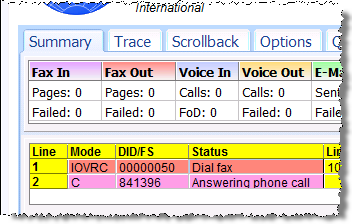
Note that when an inbound call arrives, it is first counted as a Voice Inbound call, then if fax pages are received on the call, it moves to the Fax In column.
