CopiaFacts supports DataMatrix 2-D bar-codes to allow an identifying marker to be placed on an outgoing document and retrieved when the document is returned. Both faxes and e-mailed PDF files can be so marked. FFVIEWER can also encode and decode DataMatrix 2-dimensional barcode symbols.
CopiaFacts can also create QR symbols in output fax and PDF documents, but currently does not support recognition and decoding of QR symbols. The main use of QR symbols, and their original purpose, is for Internet links and smartphone recognition, so DataMatrix is a better choice for "round-trip" applications.
Encoding is provided in FFVIEWER to set up and test symbol annotations which may be later applied dynamically. This is done by using CF9IMAGE to write the symbol on a TIF file to be faxed or a PDF to be e-mailed. You would use this to mark an outgoing document with a code that can be recognized when the document is sent back to you.
Decoding is provided in FFVIEWER to set up and test the decoding of DataMatrix symbols which may be used in a post-receive process on incoming faxes, or in infobox processing selected by the SMTP Gateway for incoming e-mails.
 | Decoding is a processor-intensive operation. You should set a timeout in the INI file if you expect to handle images where the symbols are likely to be distorted or absent, and if you use the decoding function in the Application Support DLL you should do so in a worker-box task, not in a post-receive process, and running on a machine with multiple processor cores. |
To encode a DataMatrix (DM) or QR symbol, create an annotation whose content contains: [DM]String to encode, or [QR]linkurl respectively. This works in a similar way to entering a .BMP filename as the annotation text. The string can contain variable references.
| Note that the size of the generated DM symbol is set by the default or override parameters described below: the size of a generated QR symbol is set from the size of the annotation; it is best to make the annotation square, but the shorter of length and height wins. |
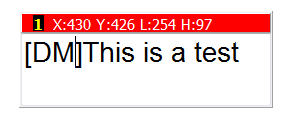
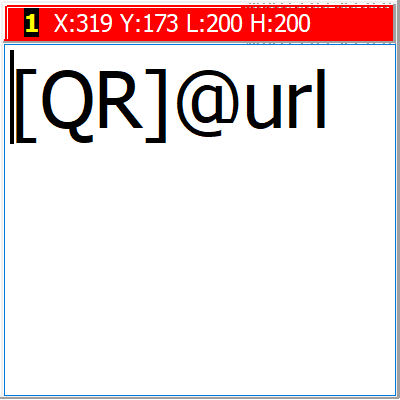
When you select 'Show bitmap graphic, not filename' in the Annotation right-click menu,
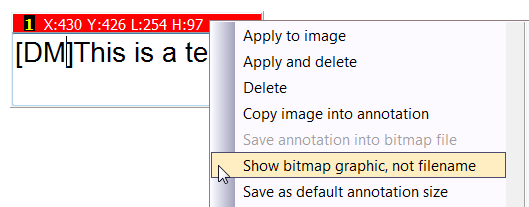
the symbol will then appear as a graphic instead of the text:
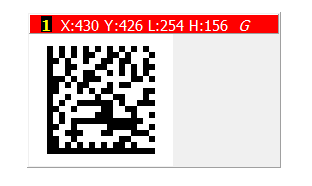
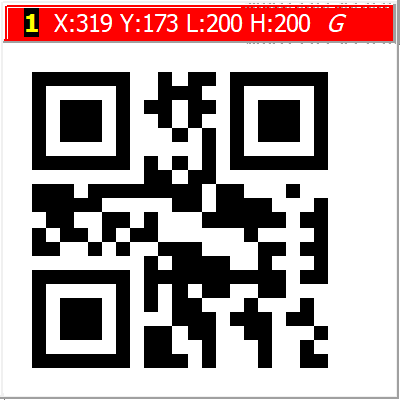
To override the DM or QR encoding settings, enter the name of an INI file inside the square brackets, separated by a colon character: [DM:@FFBASE\DM.INI]String to encode. Note that variables are only expanded in FFVIEWER in the INI pathname, whereas in CF9IMAGE variables are also expanded in the string to encode.
For DM symbols, the INI settings used are in a section named [DATAMATRIX-ENCODE] and are as follows:
MarginSize= |
The white space to be left around the symbol, in pixels. Default value 12 pixels. A larger margin makes recognition easier. |
ModuleSize= |
The size in pixels of each square element of the symbol. Default value 6 |
SymbolSize= |
One of the symbol sizes: s, r, 10x10, 12x12, 14x14, 16x16, 18x18, 20x20, 22x22, 24x24, 26x26, 32x32, 36x36, 40x40, 44x44, 48x48, 52x52, 64x64, 72x72, 80x80, 88x88, 96x96, 104x104, 120x120, 132x132, 144x144, 8x18, 8x32, 12x26, 12x36, 16x36, 16x48. The first two codes denote auto-sized square or rectangular symbols. The default is s: autosized, square. If the size is not large enough for the string to be encoded, no symbol is created. |
SymbolScheme= |
One of the scheme code letters: a:ASCII (default), c:C40, t:text, x:X12, e:Edifact, 8:Base256. |
The size of the annotation will be increased to accommodate the symbol, if necessary.
For QR Symbols the only override, in a section named [QR-ENCODE] is the MarginSize value. In this case the value is expressed in units equal to the size of element-squares in the symbol. The default is 2, so if the symbol has 12x12 elements, the overall size will be 14x14.
Decoding DM Symbols in FFVIEWER
To Decode a DataMatrix symbol in FFVIEWER, press D while displaying a page which contains a DataMatrix symbol in full sized view. The default is that the first symbol found on the page is detected. The detected text is displayed in a pop-up window.
If a file DATAMATRIX. INI is present in the base FAXFACTS folder, and if it has a [DATAMATRIX-DECODE] section, its content is used as follows.
Milliseconds= |
Timeout in milliseconds for each detection. Default value 5000. |
Square Deviation= |
Allow non-square corners (degrees 0 to 90). Default value 5. |
SymbolSize= |
One of the symbol sizes: a: consider all sizes (default), s: consider only squares, r:consider only rectangles, or one of the number codes above to signify that only symbols of the exact size will be considered. |
Verbose= |
A numeric value other than zero will cause details of the coordinates to be written to the trace file, if enabled. |
Unicode= |
A numeric value other than zero will cause the message text to be interpreted as Unicode |
Stop After= |
A count of the number of symbols to scan for. Default value 1. Increasing this value will cause analysis to take much longer. |
The default is to scan for symbols on the whole page. You can limit the range on which a symbol is searched for by adding sections [RANGE01], [RANGE02] etc. to the DATAMATRIX. INI file. In each such section, the following keys should be supplied. Note that when you specify a range, the corresponding diagonally opposite range is also automatically enabled, in case the fax is transmitted upside down in a fax machine.
| Limiting the area of scan can greatly speed up the detection operation. |
Page= |
The page number to scan: 0 = all pages (not used in FFVIEWER, only the visible page is scanned) |
XMIN= |
A value or percentage, measured from the left: do not scan to the left of this value. |
XMAX= |
A value or percentage, measured from the left: do not scan to the right of this value. |
YMIN= |
A value or percentage, measured from the bottom: do not scan pixels below this value. |
YMAX= |
A value or percentage, measured from the bottom: do not scan pixels above this value. |
Example:
This example searches in the bottom-left corner and top-right corner of each page:
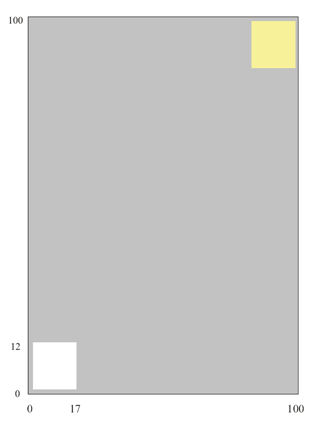 |
[DATAMATRIX-DECODE] Milliseconds=10000 Verbose=1 [RANGE01] Page=0 xMin=2% xMax=17% yMin=2% yMax=12%
Note that the range describes the WHITE square, but |
Any document being personalized by means of a GCT/GTT file (for TIF files) or a GPT file (for PDFs) can have a custom identification DataMatrix code applied as it is processed for transmission.

To do this, set up an annotation as described above, with a personalized text variable, for example [DM]@BCF3 to take the value from the third column of a broadcast list. When the annotation is applied, it will be applied as a DataMatrix symbol.
Decoding Automatically - E-Mail
Incoming e-mail can be decoded by setting up in the SMTP Gateway a worker-box template file and a suitable infobox sequence which it calls. The infobox should call the decoding routine in the Application Support DLL named DecodeDataMatrix. To do this, your infobox might contain:
$set_var DECODE_TIF @SMTP_ATTFILE01 ; get attachment pathname
$set_var DECODE_INI "@FFBASE\DM.INI" ; get optional parameters
$set_var RTN "$fn:DecodeDataMatrix('@DECODE_TIF', '@DECODE_INI')"
$ifn @RTN = @EMPTY ; check for no errors
$set_var SAVE @DECODE_MSG ; save decoded message
$else
... handle error
$endif
Additional notes on the above code:
•Any of the optional decoding and range parameters shown above may be placed in the INI file
•To obtain the position of the DataMatrix symbol, set Verbose=1 in the INI file. The (high-res) pixel coordinates will then be made available in variables DECODE_aax, where aa is TL, TR, BL, BR for top left, top right, bottom left and bottom right, and x is either X or Y for the distance from the left and top of the page. Note that the origin of these measurements is the top left, whereas the origin of range specifiers is bottom left.
•You can call the decoder multiple times with different ranges in different INI files if you wish.
Although it is possible to use DMDECODE.DLL to decode the Datamatrix symbol on received faxes, we strongly discourage its use in a post-receive infobox sequence. This is because decoding can take several seconds, and the receive fax channel will be out of service until it completes, which can result in the loss of incoming calls.
Instead, write a worker-box FS file in your post-receive process, which can then call a variant of the infobox described above.
| Sample infoboxes for Datamatrix decoding are available in the SAMPLES\DATAMATRIX folder. |
Implementation Details
CopiaFacts' DataMatrix features currently make use of the latest stable release of the open source libdmtx library (in LIBDMTX.DLL), which is Copyright 2005-2011 Mike Laughton and others. All rights reserved. This software is provided by the copyright holders and contributors 'as is' and any express or implied warranties, including, but not limited to, the implied warranties of merchantability and fitness for a particular purpose are disclaimed. In no event shall the copyright holder or contributors be liable for any direct, indirect, incidental, special, exemplary, or consequential damages (including, but not limited to, the procurement of substitute goods or services; loss of use, data, or profits; or business interruption) however caused and on any theory of liability, whether in contract, strict liability or tort (including negligence or otherwise) arising out of the use of this software, even if advised of the possibility of such damage.
