You have just installed CopiaFacts, and have set up an FoIP interface for it such as XCAPI. You may even have used the TE-Systems XTEST utility to try sending a fax without CopiaFacts. And you could try starting COPIAFACTS.
But how do you verify that COPIAFACTS itself can send a fax?
•You could wait until you have configured the CopiaFacts Gateway for email-to-fax. You would also first need to set up the CopiaFacts document converter if you need to send a PDF or DOCX file.
•You could find FFBC, set up a single-item fax broadcast list, and find a document to send, then launch the 'broadcast' in FFBC
 | As a simpler alternative, we provide a SIMPLE FAX TEST file, an FS file to initiate a fax, which you can spend less than a minute editing, and then watch a fax send starting in the COPIAFACTS progam. |
Open the Sample FS file at FAXFACTS\CALLBACK\TOSEND\SIMPLEFAX.FST by double-clicking it; it should open in COPIAEDIT. Note that it is not yet picked up from the TOSEND folder by the CopiaFacts engine because its extension is not .FS. Here are the contents:
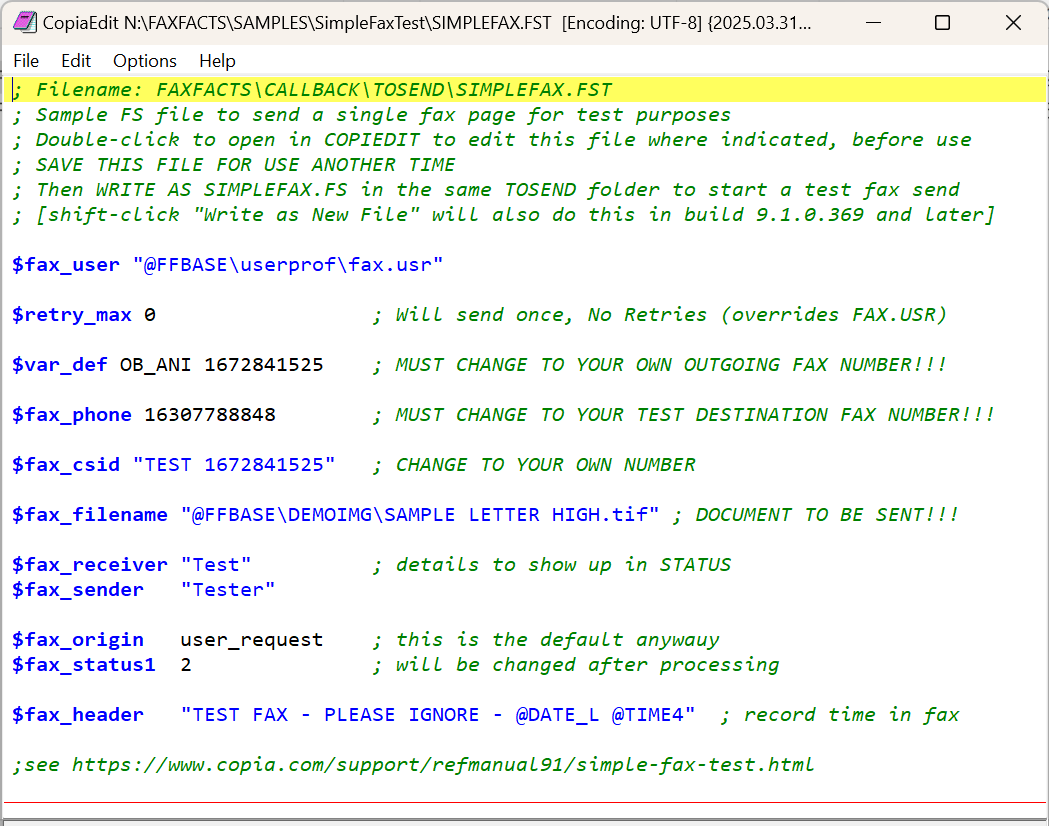
Every fax sent by the CopiaFacts engine is effectively initiated by a file like this one (but usually with more commands to control processing). But most of the time you will never need to see inside these files nor will you have to edit one manually. For this simple test, though, just follow these steps using COPIAEDIT:
•Change both the 3333333333 entries to your own fax number from which COPIAFACTS will send faxes.
•Change Copia's fax number (16307788848) to a fax number you will send the test fax to.
•Save the .FSS file so that you can modify it and use it again later.
•From build 9.1.0.370, and only for FST files in a TOSEND folder, COPIAEDIT allows you to shift-click "Write as New File" in the File main menu to cause the file to be saved as an FS file in the same folder, leaving the FST file open for further editing. If COPIAFACTS is running, it should then pick it up and start sending the fax. Leave time for it to do so before repeating this. Alternatively -
•Write As a New File changing the extension manually to .FS extension in the same folder. If COPIAFACTS is running, it should then pick it up and start sending the fax.
This test demonstrates as simply as possible how CopiaFacts initiates a fax. The test eliminates all other processing such as receiving an email, converting a document to fax format, reporting fax results, monitoring the operations, etc. It is intended to allow verification of the most basic functions of sending a fax, as well as illustrating what is going on at the lowest levels.
What happens if it works? The FS file should have been moved to the CALLBACK\SENT folder. If you open SIMLPLEFAX.FS there, it will have grown quite a lot and will include variable definitions containing the results. And of course you should also find the faxed document at the destination.
What happens if it fails? The FS file will have been moved to the CALLBACK\FAIL folder. Open it there and look for defined variables such as LAST_OUTCOME to find a reason for failure.
What happens if the FS file stays in TOSEND? This means it was not picked up for processing. Is COPIAFACTS running? is the TOSEND queue enabled for outbound faxes? Start TRCVIEW and open the most recent engine trace file (.TRx) for the node for a full report.
