An internal converter can be used to convert HTML documents to to TIF. This can be used both on documents received for faxing from external sources or web sites, and for faxing of documents which you create as HTML.
CopiaFacts variables are expanded in HTML documents if you specify this in the preprocess setup dialog in FFEXTERN.
This method of conversion has the following advantages:
•The Document Converter print driver is not required.
•HTML can be converted to PDF for e-mailing as well as to TIF for faxing. The PDF in this case will contain an image of the HTML document pages.
•The IMAGE_OPTIONS variable can be used to customize the image processing as the TIF is created. This allows a range of dithering options for color originals, as well as image enhancements.
•The aspect ratio of the document is preserved.
•Output TIF files are often dramatically smaller and therefore can be transmitted more quickly.
•Conversion is faster without the overhead of loading Internet Explorer for each conversion.
If you prefer to use Internet Explorer for HTML conversions, the $convert_options keyword IE (I) will select this option. The Document Converter print driver is required for this option.
If you are using Document Converter to download an HTTP document for conversion to TIF, you must not use the Internal HTML converter if the document is to be formatted using Javascript. This type of document requires the use of the $convert_options keyword IE (I) and scripting must be enabled in Internet Explorer.
HTML Pixel Coordinates
Many HTML documents have page and margin sizes in pixels, for example '600px'. When rendering to TIF, this can result in the size of the objects on the output page being dependent on the screen resolution of the machine on which the CopiaFacts document converter being run. This resolution is that selected in Screen / Properties / Make text and other items larger and smaller:
|
|
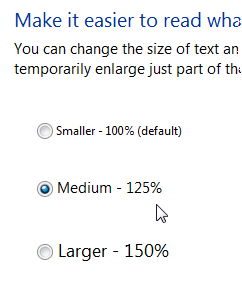

In Windows, the 'small' size corresponds to 96dpi, medium to 120 dpi, larger to 144 dpi and extra large (if available) to 192 dpi. CopiaFacts uses a default of 96 dpi, but you can change this with the IMAGE_OPTIONS value DPIn where n is the DPI value you wish to use.
If you have control over the creation of the HTML documents, we recommend that you should use Inch or Millimeter measurement units which will be applied to the TIF image directly, subject to any scaling that may be specified.
Page Sizes
An HTML documents is usually intended for viewing and scaled viewing in a browser, and in most cases it can therefore be successfully constrained into standard page sizes for use in faxing. If you have not defined the PAGESIZEn keyword in the active $image_options set, the page size used will be US Letter in the USA locale, and A4 elsewhere.
You should be aware that US Letter and US Legal width, at 8.5 inches, is very slightly larger than the standard fax width of 1728 pixels at 204 horizontal pixels per inch (8.47 inches) so the document may be truncated if the SCALE keyword is absent from the active $image_options set. It follows from this that if the HTML document does not specify page margins, the text may sometimes be very close to the edge of the fax.
To handle
The conversion process will fetch images from remote servers when specified as an image source. However when you have control of the HTML document source it may be more convenient, as well as much faster, to place the images in a local folder and use a file:/// URL to load them. The folder must be accessible with the same URL path from all machines which may convert the HTML document. To use a network location you will need five forward slashes in the URL, for example:
src="file://///machine/COPIA/FAXFACTS/MyHTMLImages
For files in a folder relative to the folder as the html file use just three slash characters:
src="file:///images/logo.png
The built-in HTML converter can also handle image files without the URL prefix, but some versions of Internet Explorer may not do so.
See also Supported Document Formats for other image conversion options.
